

Table of Contents
WearView vs FASHN: which is better for creating accurate virtual try-on images for a clothing store?
Choose WearView for studio and pose-led production; choose FASHN for multi-reference conversational work or API integration. As of October 24, 2026, the clearest differences are in workflow controls, not a demonstrated universal advantage in garment accuracy. WearView offers same-model pose production; FASHN’s October product changelog adds up to six Agent image references and broader Studio custom-face access. Your deciding measure should be faithful, publishable images per dollar and hour.
Compare garment inputs, identity controls, pose production and integration access. In FASHN, Agent handles conversational requests, Studio provides dedicated production tools, and API endpoints serve integrations.
| Capability | WearView | FASHN |
|---|---|---|
| Virtual try-on | Garment-photo workflow accepts flat-lay, hanger and ghost-mannequin inputs | Studio Try-On applies products to specific model photographs |
| Product-to-model | Creates on-model imagery from garment photographs | Studio Product to Model starts from product photographs |
| Model creation | Reusable models across poses and settings. Custom models on Pro and above. | Studio Create Model builds reusable identities from text |
| Face and identity references | Pro-and-up custom models support saved-identity production | Agent face references on any plan; default within-conversation consistency from October 1; Studio custom faces on all paid plans from October 14 |
| Ghost mannequin and flat-lay production | Ghost Mannequin and Pro Flat Lay support runs of up to 50 garments | Studio Product to Model turns product photographs into on-model imagery |
| Pose control | Same-model pose production across multiple poses and settings | Agent requests can assign pose references alongside product references |
| Browser production | Studio-oriented production workspace | Browser Agent and Studio workflows |
| API access | Enterprise custom integrations and workflows | Public API documentation and developer billing |
For FASHN Studio custom faces, all paid plans are eligible following the October 14 update; the older Agency-only pricing wording no longer applies. WearView’s plan choice also affects custom-model access, resolution charges and production tools.
Source photos, reference roles and reusable models
Garment-only versus person-plus-garment inputs
Product-to-model work starts with a garment photograph; try-on onto a particular person adds a chosen model photograph. FASHN separates these into distinct Studio workflows. For WearView’s flat-lay, hanger and ghost-mannequin inputs, use a well-lit, whole-item view without wrinkles.
Visibility matters more than an elaborate prompt. Cropped hems, folded prints, hands over fastenings and overlapping layers remove information the generator needs. Supply another authorized view when a material detail is hidden.
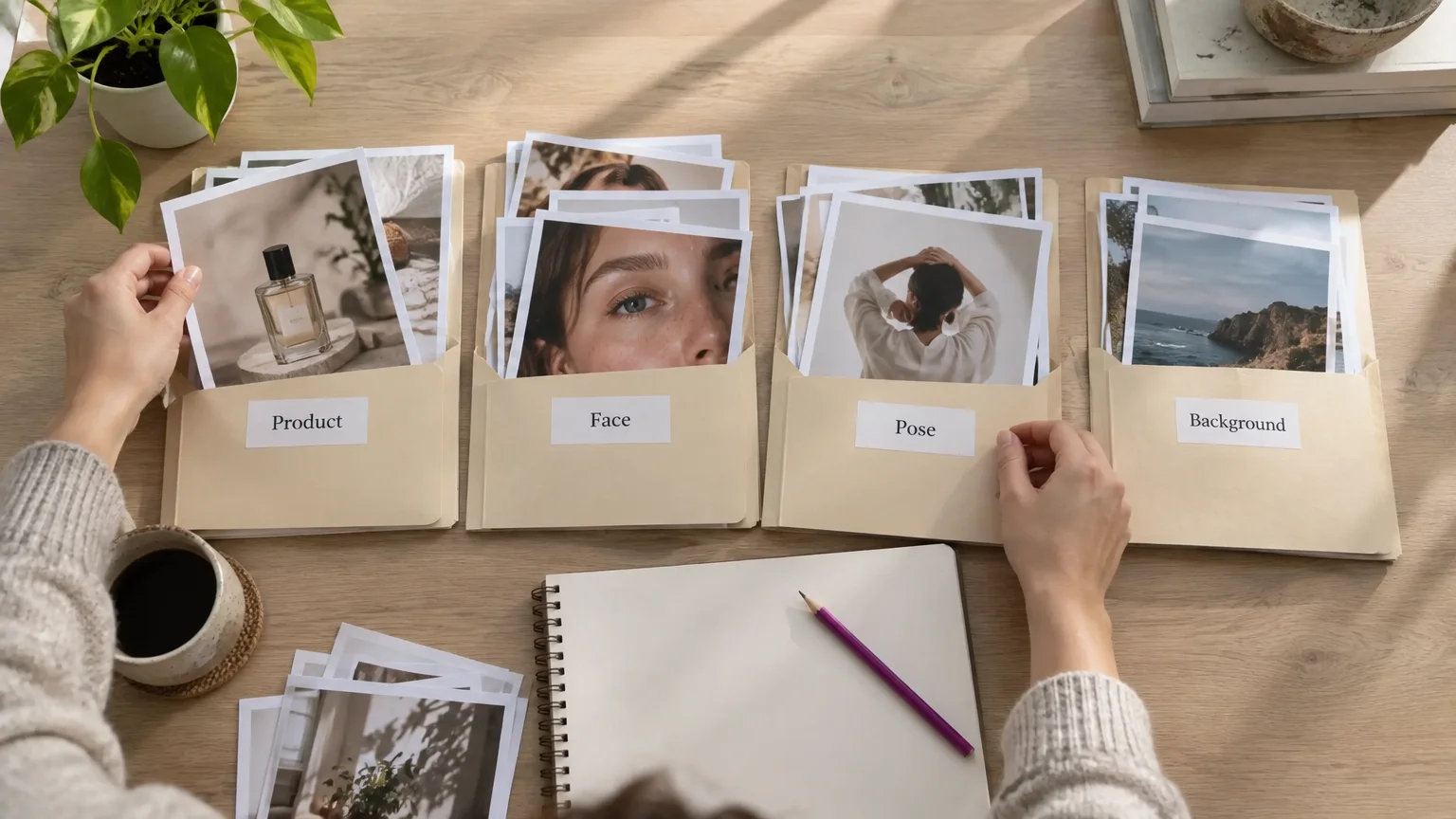
| Reference role | What to specify | What to inspect |
|---|---|---|
| Product | Garment construction, color and visible decoration | Prints, logos, seams and silhouette |
| Face | The intended identity | Face, hair and identity drift |
| Pose | Body position and camera relationship | Limbs, garment visibility and proportions |
| Background | Setting and visual context | Unwanted changes to product or lighting |
With FASHN Agent’s October 1, 2026 upgrade, you can assign product, face, pose and background roles across up to six image references per request. Specify each role explicitly. Reference capacity is separate from garment count, output count and simultaneous generations.
Identity across conversations and collections
FASHN Agent’s default consistency applies within a conversation. Its face references are available on any plan, while Studio custom faces require a paid plan. WearView’s Pro-and-up custom models support saved-identity production. These controls make identity reuse worth testing beyond the initial generation.
Test identity reuse in five situations: another product, another pose, a reopened identity, a new conversation or collection, and an edited approved image. Check body proportions, hair and styling as well as the face.
Browser production, batches and API automation
Both platforms support browser production; FASHN has a publicly documented API, while WearView offers enterprise custom integrations. The choice depends on whether your team needs a browser workspace or an integration with its production systems.
FASHN’s API documentation recommends Try-On Max for most applications and retains Try-On v1.6 for real-time, cost-sensitive integrations.
Before treating any batch feature as a production solution, ask four questions:
- Outputs per generation: How many alternatives does one request return?
- Simultaneous generations: How many requests can run concurrently?
- Multi-garment runs: Can one submission contain multiple products?
- API automation: Can your system queue jobs, collect results and recover failures?
WearView’s up-to-50-garment runs apply to Ghost Mannequin and Pro Flat Lay. Technical teams should also evaluate queue handling, asset naming, error recovery and human review.
FASHN’s official billing guidance states that Developer API credits are separate from app credits. API use requires its own credit purchase.
Pricing and cost per accepted catalogue image
Monthly bills versus annual commitments
Monthly app subscriptions start at $29 for WearView and $19 for FASHN. WearView’s published plan summary and FASHN’s app pricing page list the following allowances. All prices are in US dollars.
| App plan | Monthly billing | Credit allowance | Relevant identity access |
|---|---|---|---|
| WearView Lite | $29 | 50 monthly | Custom-model access starts at Pro |
| WearView Pro | $49 | 200 monthly | Custom models |
| WearView Advanced | $99 | 500 monthly | Custom models |
| FASHN Basic | $19 | 200 monthly | Studio custom faces after October 14 update |
| FASHN Pro | $49 | 750 monthly plus 50 daily | Studio custom faces |
| FASHN Agency | $99 | 1,500 monthly plus 100 daily | Studio custom faces |
WearView’s annual bills are $290, $490 and $990, paid upfront. Its monthly-equivalent prices therefore represent annual commitments, not monthly billing. Track FASHN’s daily bonuses separately from its monthly allowance.
FASHN offers 10 signup credits for sampling. Before paying, check the annual checkout total, sample restrictions, seats, credit rollover or expiry, resolution limits and video charges for your selected plan.
Credits versus accepted images
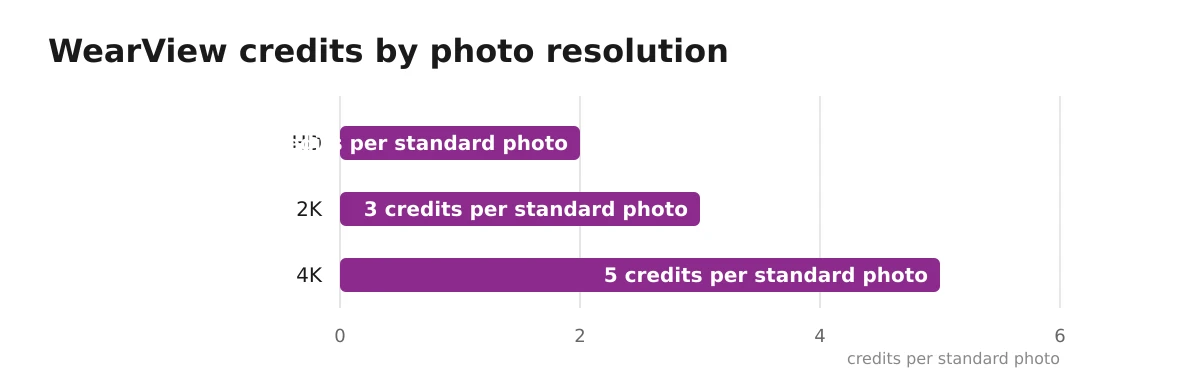
Compare the charge per generation with the number of images your team approves. WearView’s standard-photo charges illustrate why a credit allowance is not an image allowance:
| Resolution | Credits per photo |
|---|---|
| HD | 2 |
| 2K | 3 |
| 4K | 5 |
Calculate accepted-image cost by dividing allocated subscription or API spend, including top-ups, by accepted outputs. Record review and editing time in the same log. For FASHN, use the charge for the exact app tool or endpoint used.
Example: WearView Lite with rejected generations
Assume one $29 Lite month is allocated entirely to HD photos. Its 50 credits cover 25 generations. Compare the cost when all images pass review with the cost when some are rejected:
- All 25 accepted: $29 ÷ 25 × 100 = $116 per 100 accepted images.
- Only 20 accepted: $29 ÷ 20 × 100 = $145 per 100 accepted images.
Comparing costs per 100 accepted images makes the effect of rejected generations easier to see.
A reference-image acceptance procedure before you subscribe
Inspect the garment before approving the image
Test both platforms for logo, print, color and construction accuracy on your own products, using the same references and inspection rules.
- Select representative products. Include readable text, repeated prints, layering, sheer fabrics and distinctive fastenings.
- Control the comparison. Use identical originals wherever supported, equal output resolution and a fixed retry budget. Save prompts and reference assignments; record unavoidable input differences.
- Inspect full images and crops. Check logo shape, text spelling, print scale and placement, color, fabric appearance, seams, fastenings, silhouette and identity drift.
- Reject material changes. Attractive composition does not compensate for a missing pocket, altered neckline or invented closure.
- Log every attempt. Separate first-pass approvals, retries, rejected outputs, edits, credits and handling time.
For the 20-approval example, assume the 25 generations include three retries, with no edits and 25 minutes of review. Keep production effort and spending together in your review record:
| Run | Accepted / rejected | Retries | Edits | Review time |
|---|---|---|---|---|
| WearView example: 25 generations | 20 / 5 | 3 | 0 | 25 minutes |
| Run | Allocated spend | Credits consumed | Accepted-output cost |
|---|---|---|---|
| WearView example | $29 | 50 | $145 per 100 accepted images |
Recheck edits, permissions and publication requirements
After editing, inspect both the requested change and previously approved garment areas. Google Merchant Center’s product image requirements require product imagery to match the sold variant’s exact color, pattern, finish and material.
Visual try-on is not validated sizing. Google’s try-on explanation explicitly says its generative tool does not show exact fit or size and may produce discrepancies. Use product measurements and validated sizing guidance for fit decisions.
Obtain permission for uploaded photographs and real-person likenesses for the intended use. Check each vendor’s output terms and paid-ad permissions. Commercial output rights do not replace source-image permissions. For Merchant Center, preserve the AI-generation metadata required by Google’s AI content policy, including the IPTC DigitalSourceType TrainedAlgorithmicMedia tag.
A separate catalogue-to-campaign workflow option
If your work extends beyond try-on imagery to finished ads and campaign execution, consider the full production workflow alongside garment accuracy.
| Workflow option | Best fit | Trial price |
|---|---|---|
| Our studio | Catalogue imagery, finished ads and campaign execution | $1, 7-day trial on Creator and Studio 330 |
Our workflow connects Virtual Try-On, with 100+ models or your own model photo, to Smart Edit, branded image and video ads, then Meta and Google campaign execution. Our AI Assistant supports up to 500 products from one brief, with approval before generations use credits. Our product URL image ads apply saved logos and brand colors. The trial terms include 20 credits and watermarked results on eligible plans.
Commissioned product photography remains a fallback for difficult garment details that repeatedly fail generation review.
Choose by store workflow, not by an accuracy slogan
Choose the platform that produces accepted images with less handling in your actual workflow.
| Store scenario | Shortlist | Deciding test |
|---|---|---|
| Small browser-operated store | WearView for studio production; FASHN for conversational references | Approved images per working hour |
| Repeat-model collection | Both, using their paid identity controls | Identity and garment consistency across products, poses and collections |
| Larger technical catalogue team | FASHN public API; WearView enterprise integration | Endpoint fit, queue recovery, review effort and accepted-image cost |
For WearView, weigh any handling time saved by its studio, pose and saved-model controls against resolution-dependent charges and workflow-specific batch limits.
For FASHN, match your production needs to Agent, Studio or the API, then account for the features and billing of each. App credits and API credits are separate budgets.
Run the same acceptance procedure on representative garments before committing. If your next step also includes ads and campaign execution, explore our catalogue-to-campaign workflow.


